
OopsSec Store’s login page accepts a redirect query parameter that isn’t validated after authentication. We’ll abuse this to navigate to an internal endpoint that’s otherwise inaccessible.
Table of contents
Open Table of contents
Lab setup
From an empty directory:
npx create-oss-store oss-store
cd oss-store
npm start
Or with Docker (no Node.js required):
docker run -p 127.0.0.1:3000:3000 leogra/oss-oopssec-storeThe application runs at http://localhost:3000.
Target identification
The app has a login page at http://localhost:3000/login. Try visiting /profile while logged out and you’ll get bounced to:
http://localhost:3000/login?redirect=%2FprofileThat redirect parameter tells the app where to send you after login.
Exploitation
Step 1: Confirming the redirect behavior
First, verify the redirect actually works:
- Open an incognito window
- Go to
http://localhost:3000/profile - Notice you land on
/login?redirect=%2Fprofile - Log in with
alice@example.com/iloveduck - You end up on
/profile
So the parameter does control post-login navigation.
Step 2: Testing for open redirect
Now try an external URL:
- Go to
http://localhost:3000/login?redirect=https://github.com/kOaDT/oss-oopssec-store - Log in
- You land on GitHub
No validation at all. The app redirects to an external domain.
Step 3: Discovering internal endpoints
With the open redirect confirmed, let’s look for internal resources worth targeting:
gobuster dir -u http://localhost:3000/internal -w /usr/share/wordlists/dirb/common.txtThis turns up /internal/oauth/callback. Visiting it directly while authenticated just kicks you back to the homepage. The page exists, but it won’t render through normal navigation.
Step 4: Exploiting the redirect to access the internal page
Here’s the trick: the internal callback page needs a specific cookie that only gets set during login when a redirect parameter is present.
- Go to
http://localhost:3000/login?redirect=/internal/oauth/callback - Log in with
alice@example.com/iloveduck - You land on
/internal/oauth/callback
Step 5: Retrieving the flag
This time the page renders. It shows an internal debug interface with OAuth provider status and the flag:
OSS{0p3n_r3d1r3ct_l0g1n_byp4ss}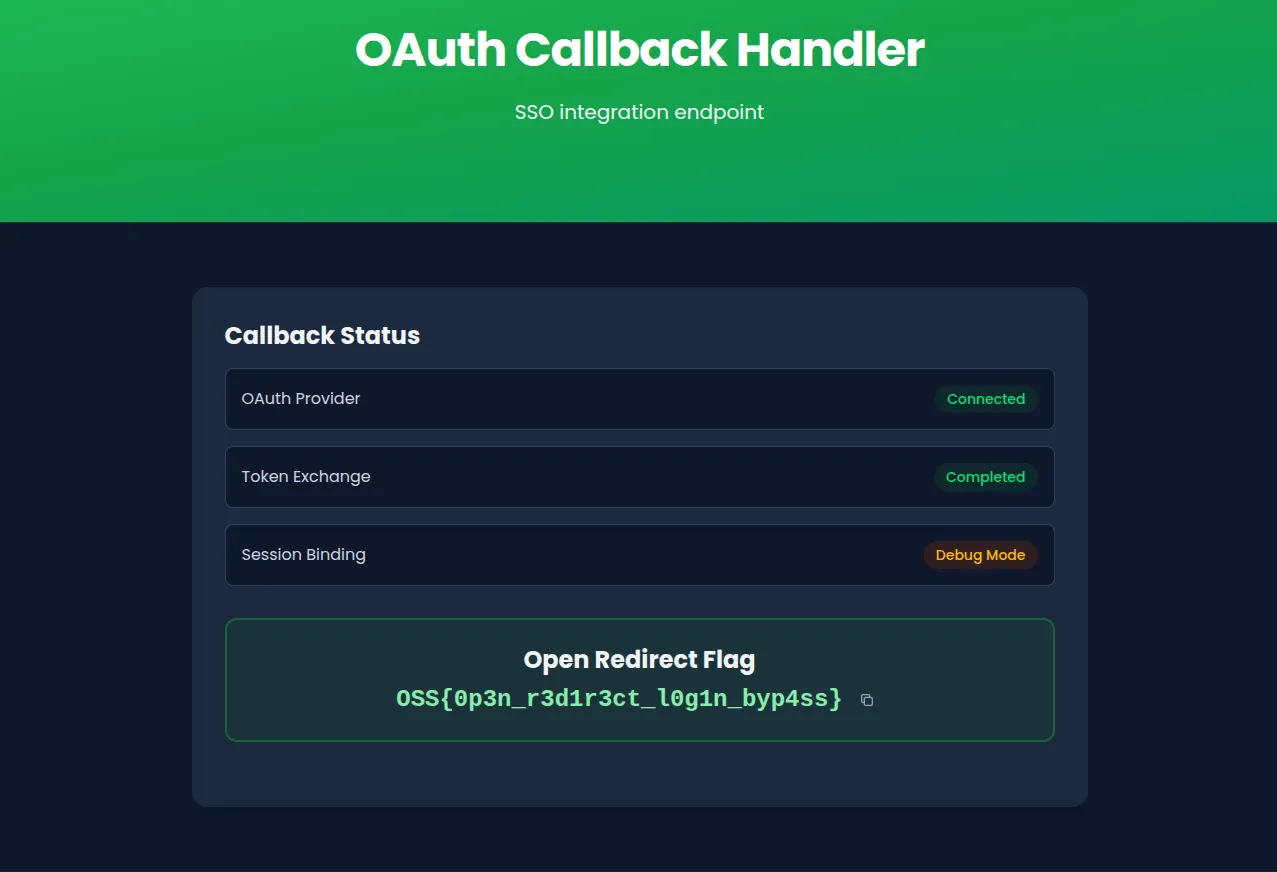
Vulnerable code analysis
In the login form component, the code grabs the redirect parameter and navigates to it with zero checks:
const redirect = searchParams.get("redirect");

// After successful login:
if (redirect) {
  window.location.href = redirect;
} else if (data.user?.role === "ADMIN") {
  router.push("/admin");
} else {
  router.push("/");
}
window.location.href will go anywhere. Relative paths, same-origin, external domains. Nothing stops it.
The login API also sets a short-lived oauth_callback cookie whenever a redirect parameter is present. The internal callback page checks for this cookie, which is why you can’t reach it by just typing the URL in your browser. You have to go through the login flow.
Remediation
The fix: validate the redirect target before navigating.
Relative path validation
The simplest approach. Only allow paths starting with a single /:
function isSafeRedirect(url: string): boolean {
  return url.startsWith("/") && !url.startsWith("//");
}

if (redirect && isSafeRedirect(redirect)) {
  router.push(redirect);
}
URL parsing and origin check
More robust. Parse the URL and compare origins:
function isSameOrigin(url: string): boolean {
  try {
    const parsed = new URL(url, window.location.origin);
    return parsed.origin === window.location.origin;
  } catch {
    return false;
  }
}
Allowlist approach
If you only have a handful of valid destinations, just list them:
const ALLOWED_REDIRECTS = ["/", "/profile", "/admin", "/orders", "/cart"];

if (redirect && ALLOWED_REDIRECTS.includes(redirect)) {
  router.push(redirect);
}
Whichever approach you pick, using router.push() instead of window.location.href also helps since Next.js router only handles same-origin routes.