
Someone left a debug log in the login route that dumps passwords in plaintext. Those logs end up on a hidden SIEM dashboard protected by default credentials. We’ll find it, log in, and read everyone’s passwords.
Table of contents
Open Table of contents
Lab setup
From an empty directory:
npx create-oss-store oss-store
cd oss-store
npm start
Or with Docker (no Node.js required):
docker run -p 127.0.0.1:3000:3000 leogra/oss-oopssec-storeThe app runs at http://localhost:3000.
Reconnaissance
Login mechanism
There’s a login form at /login. Submitting credentials sends a POST to /api/auth/login with a JSON body:
{
  "email": "alice@example.com",
  "password": "test"
}
The response doesn’t leak anything useful whether login succeeds or fails.
Directory enumeration
Run gobuster (or any directory brute-forcer) against the app:
gobuster dir -u http://localhost:3000 -w /usr/share/seclists/Discovery/Web-Content/common.txt/monitoring shows up, which is worth poking at. Enumerate one level deeper:
gobuster dir -u http://localhost:3000/monitoring -w /usr/share/seclists/Discovery/Web-Content/common.txtThis turns up /monitoring/siem — not linked anywhere in the app.
The SIEM dashboard
Hit http://localhost:3000/monitoring/siem and you get a login form titled “SIEM Console — Internal Monitoring System.”
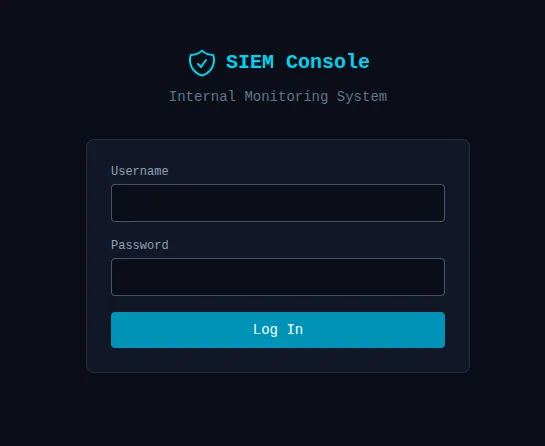
An internal log viewer sitting on a public port. Promising.
Bypassing SIEM authentication
Internal tool, hastily deployed — default credentials are always worth a shot:
| Username | Password |
|---|---|
| admin | admin |
| root | admin |
| root | root |
| admin | password |
root / admin gets us in.
Triggering the credential leak
The dashboard is empty until someone actually logs in. Fire off a login attempt on the main app:
curl -X POST http://localhost:3000/api/auth/login \
  -H "Content-Type: application/json" \
  -d '{"email":"alice@example.com","password":"iloveduck"}'
Reading the logs
Back on the SIEM dashboard, the log table shows all captured log output. Search for [auth] or login attempt and you’ll see something like:
[auth] login attempt email=alice@example.com password=iloveduck flag=OSS{pl41nt3xt_p4ssw0rd_1n_l0gs}The flag is OSS{pl41nt3xt_p4ssw0rd_1n_l0gs}.

Vulnerability chain
Four things had to go wrong for this to work:
- CWE-532 — A
logger.warncall in the login route dumps the email, password, and flag in the log message on every attempt. - CWE-312 — The structured logger writes these entries to
logs/app.login cleartext. - CWE-200 — The SIEM dashboard at
/monitoring/siemis unlisted but easy to find with directory enumeration. - CWE-798 — The SIEM login uses default credentials (
root:admin).
Remediation
Don’t log request bodies or sensitive fields. Even with a structured logging library like Pino, use field redaction so passwords can’t end up in output even if someone forgets.
Treat logs as sensitive data. Access controls, encryption at rest, retention policies — if logs contain anything that could identify a user, they need the same care as a database.
Internal tools need real credentials. Default passwords on an internal dashboard are fine until the dashboard is reachable from the internet. Use a secrets manager or SSO; never ship root:admin.
Review log messages for sensitive data during code review. A structured logger doesn’t prevent developers from embedding credentials in the message string itself.